
Add Vets Website to your mobile phone home screen

7th July 2023
Some of our members may have trouble remembering our website url, or have trouble setting up an icon for the Vets website when on their mobile phones (www.clvets.co.uk/)
Here are a few simple instructions on how to set up a shortcut (or website icon) and how to place it on your mobile phone's home page - both for an iphone mobile and an android based mobile phone:
Iphone based mobile phone
Open Safari web browser and navigate to our website - www.clvets.co.uk/
Open the Share Sheet for Safari (Tap the Share icon at the bottom of Safari. This looks like a box with an arrow pointing out the top of it):

If you can’t see the Share icon, scroll up or tap the bar at the top of Safari to reveal it.
Tap Add to Home Screen from the Share Sheet. (At the bottom of the Share Sheet, beneath the app icons, you should see a list of actions. This list typically starts with Add to Reading List or Add Bookmark). Scroll further down to reveal more actions and tap Add to Home Screen to create your website shortcut:
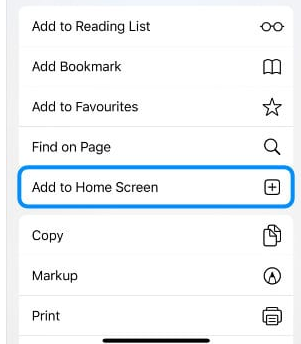
Create a name and save your website shortcut.
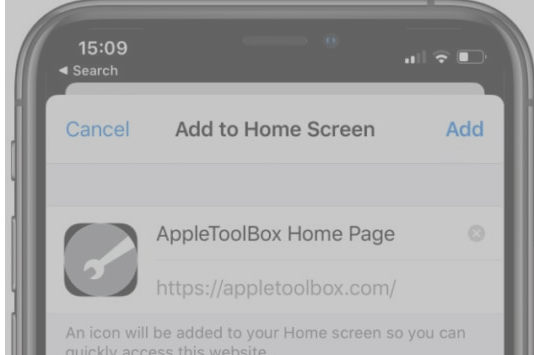
After tapping Add to Home Screen, choose a name for your website shortcut. This name displays beneath the website icon on your iPhone, iPad, or iPod touch Home screen.
When you’re finished, tap Add in the top-right corner to create your shortcut:
Rearrange the website shortcut on your Home screen. Your website shortcut appears in the next available space on your iPhone, iPad, or iPod touch Home screen. You can identify it by the name you gave it (e.g. Vets Website) and the website icon.
Android based mobile phone
To add a website to your Android home screen, open Chrome and go to the website (www.clvets.co.uk/)
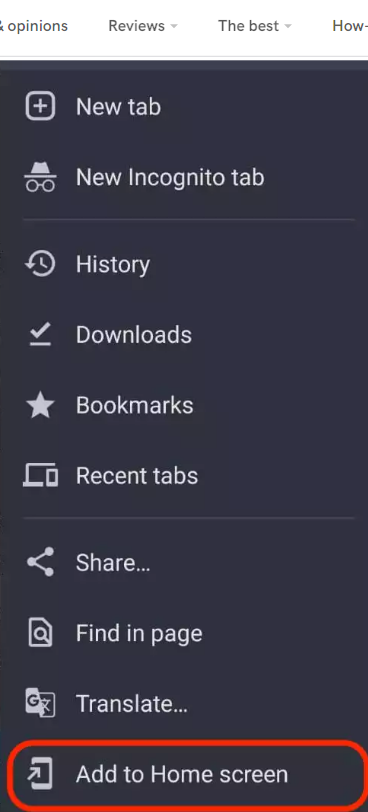
Then drop down the menu by tapping the screen’s three-dot icon at the top right-hand corner. Select Add to Home screen:
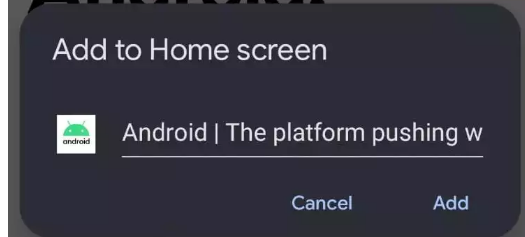
Next, you have the opportunity to edit the title of the icon. Once the title looks fine, tap Add to transfer it to the home screen:
If you go back to your home screen, you will now see the new icon for the Vets Website.
Any questions please drop me a line - martyn.heath@btinternet.com
Comments